> For the complete documentation index, see [llms.txt](https://help.pletox.com/llms.txt). Markdown versions of documentation pages are available by appending `.md` to page URLs; this page is available as [Markdown](https://help.pletox.com/regularization-request.md).
# Regularization Request
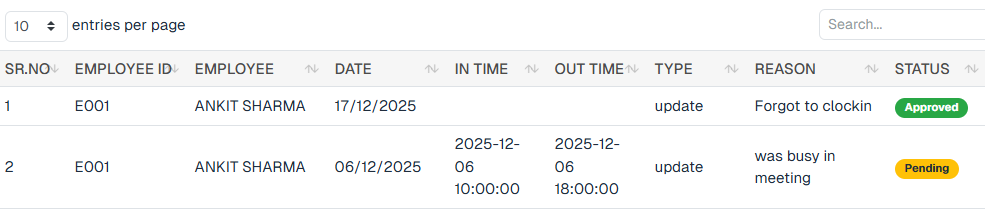
The Attendance Regularization module allows the Superadmin to review, approve, or reject attendance correction requests submitted by employees.
This module ensures accurate attendance records when an employee:
* Forgets to clock in or clock out
* Enters incorrect punch timings
* Faces technical or operational issues during attendance marking
#### Employee Settings – Regularize Attendance Permission
**Navigation Path:**\
**Settings → Organization → Employee → Edit Employee → HR Permissions**\
\

\

To allow an employee to regularize attendance, enable the following permissions:
* **Regularize Attendance**\
Enables the employee to submit attendance regularization requests.
Once enabled, save the changes to apply permissions.
### Admin Settings – Regularization Approval Permission
**Navigation Path:**\
**Settings → Organization → Employee → Edit Employee (Admin) → HR Permissions**
To allow an admin to review and approve regularization requests:
* Enable the **Regularize Attendance** module.
* Enable the **Regularize Request** module.
* Enable all related toggles, including:
* **Can Approve**
After enabling the required permissions, click **Save** to apply changes.
### Superadmin Approval Workflow
#### Step 1: View Regularization Request
Superadmin reviews:
* Employee details
* Original Clock in times
* Requested clock-in and clock-out times
* Reason provided by the employee
**Superadmin approves the request.**\
\
Employees can submit a regularization request, which is reviewed and \
approved by the **Superadmin**. Once approved, the corrected time is\
automatically updated in the employee’s attendance record.
#### Columns Displays
* **SR. NO** – Serial number of the request
* **Employee ID** – Unique employee identifier
* **Employee Name** – Name of the employee who raised the request
* **Date** – Date for which attendance is requested to be regularized
* **In Time** – Requested corrected clock-in time
* **Out Time** – Requested corrected clock-out time
* **Type** – Type of regularization
* **Reason** – Reason provided by the employee
* **Status** – Current request status (Pending / Approved / Rejected)
### Action Buttons
Each request includes the following action options:
* **Edit**
Modify regularization details if required before approval
* **Delete**
Permanently remove the regularization request
### Filter Options
At the top of the Regularization page, Superadmin can use filters to quickly find specific requests.
#### Available Filters
* **Start Date** – Filters records from the selected start date onward.
* **End Date** – Filters records up to the selected end date.
* **Employee Name** – Filters records for the selected employee.
* **Type** – Filters records based on the selected type.
* **Clear** – Removes all applied filters and resets the list.
### Regularize Attendance (for Employee)
The Regularize Attendance feature allows employees to request corrections for missed or incorrect attendance entries, which are then reviewed and approved or rejected by an admin.
### How Regularize Attendance Works
1. The employee logs in to the system.
2. From the sidebar, the employee navigates to **Attendance → Monthly**.
3. In the monthly attendance view, the employee can see attendance details for each date.
4. Beside the **Remarks** column, a **Regularize** button is available for each date.
5. On clicking the **Regularize** button, a dialog box opens asking for:
* Reason for regularization
* Correct Clock In Time
* Correct Clock Out Time
1. The employee submits the regularization request.
2. The request is sent to the **Super Admin** for approval.
3. The Super Admin reviews the request in the **Regularization Requests** module.
4. The Super Admin can **Approve** or **Reject** the request.