> For the complete documentation index, see [llms.txt](https://help.pletox.com/llms.txt). Markdown versions of documentation pages are available by appending `.md` to page URLs; this page is available as [Markdown](https://help.pletox.com/salary-hold.md).
# Salary Hold
The Salary Hold module is used to temporarily hold an employee’s salary, either partially or for the full month, due to specific reasons defined by the organization.
Any entry made in this module directly impacts payroll calculation during the payroll run.
This module is **accessible only to Super Admin**. Employees and other roles do not have access to this module.\
\
**Overview :**
**At the top of the Salary Hold module, two buttons are available:**
#### 1. Filters:
The **Filters** button is used to search and refine salary hold records.
Available filters:
* **Month** – Filters records for the selected month.
* **Employee** – Filters records for the selected employee.
* **Company** – Filters records based on the selected company.
* **Department** – Filters records based on the selected department.
* **Location** – Filters records based on the selected location.
**Clear Button:**
* Clears all applied filters
* Resets the view to default
#### 2. Salary Hold :
The **Salary Hold** button is used to create a new salary hold entry.
**Creating a Salary Hold Entry:**
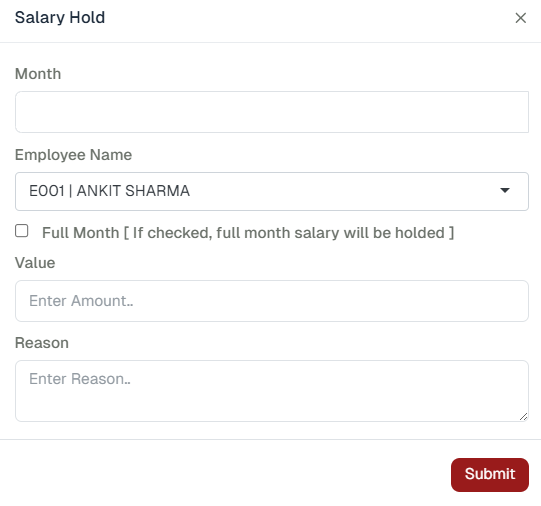
When the **Salary Hold** button is clicked, a dialog box opens requesting the following details:
1. **Month**
* Select the payroll month for which the salary is to be held.
2. **Employee Name**
* Select the employee whose salary is being held.
3. **Full Month Checkbox**
* If selected, the employee’s **entire salary for the selected month** will be held.
4. **Value**
* Enter the **amount** to be held.
5. **Reason**
* Enter the reason for holding the salary
After entering the required details, the salary hold entry is saved.
### Salary Hold Listing Columns:
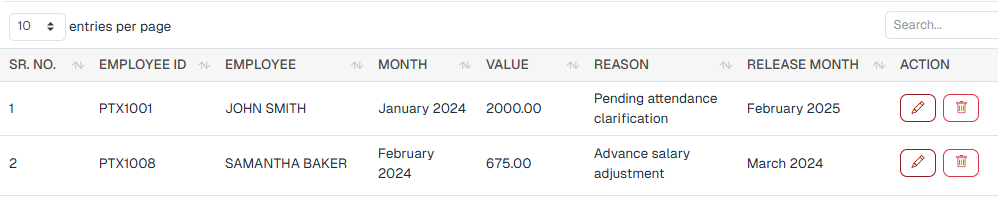
Once entries are created, the Salary Hold list displays the following columns :
* **Employee ID** – Displays the unique identification number of the employee.
* **Employee Name** – Displays the name of the employee.
* **Month** – Displays the month in which the salary was held.
* **Value (Held Amount)** – Displays the amount of salary that was held.
* **Reason** – Displays the reason for holding the salary amount.
* **Release Month** – Displays the month in which the held salary will be released to the employee.
* **Action button-**\
**Action** – Provides **Edit** and **Delete** buttons to modify or remove the salary hold record.
### Impact on Payroll:
* When payroll is run for a month in which a **salary hold entry exists**:
* The held amount appears in the **Salary Hold** column in the **Salary Report**.
* The held amount is **deducted from the total net payable salary** for that payroll cycle.
* The salary hold deduction is reflected automatically and requires **no manual adjustment** during payroll processing.
###