> For the complete documentation index, see [llms.txt](https://help.pletox.com/llms.txt). Markdown versions of documentation pages are available by appending `.md` to page URLs; this page is available as [Markdown](https://help.pletox.com/working-on-offs.md).
# Working On Offs
The Working on Offs module in Pletox is designed to record and manage instances where an employee works on week offs or company-declared holidays.
This module ensures accurate tracking of such work for compliance, payroll processing, and internal records.
Entries in this module can be:
* **Automatically created by the system** when an employee works on a holiday or week off, or
* **Manually added by the Super Admin**, if required.\
Access Control
* This module is accessible to **Super Admin** users only.
* Employees cannot add or modify entries in this module.
### Adding Working on Offs (Manual Entry)
#### Steps to Add a Manual Entry
1. Navigate to the **Working on Offs** module in Pletox.
2. Click on **Add Working on Offs**.\
\

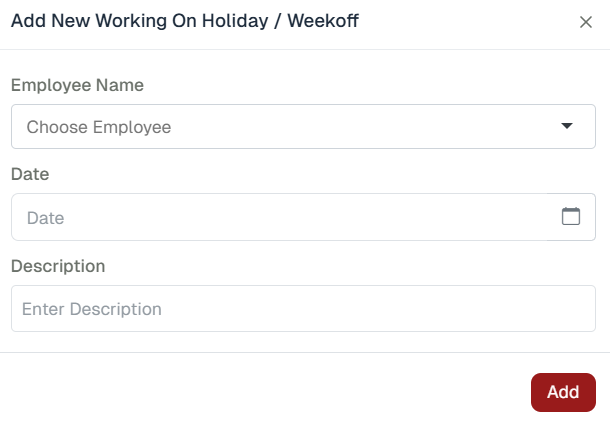
3. A dialog box will open requesting the following details:
4. **Employee Name** – Select the employee from the list
5. **Date** – Select the holiday or week off date
6. **Description** – Enter the reason or work details
7. Click on **Add** to save the entry.
Once added, the entry will be recorded successfully in the system.
### Filters:
The **Filter** option allows Super Admins to easily search and manage records.
#### Available Filters
**Date** – Filter records by specific date or date range\
**Employee** – Filter records by employee name
* #### Working on Offs Listing:
After adding an entry, the details will be displayed in the listing table with the following columns:
* **Employee ID** – Unique identification number of the employee
* **Employee Name** – Name of the employee
* **Date** – Date on which the employee worked on a holiday or week off
* **Day** – Day of the week
* **Hours** – Total hours worked
* **Description** – Work details or remarks entered by the Super Admin
* **Action** – Option to delete the entry
###